

The Macaaw API lets your own systems run the PDF tools, send documents for signature and start invoice checks. You manage it on Developers and API in your account. The full reference is in the developer documentation.
Before you start
- Sandbox keys work on every plan. They are free, their output is stamped "SANDBOX — NOT A VALID DOCUMENT", documents can only be sent to your own email address or domain, and they allow 10 requests a minute.
- Live keys need a plan with API access: Pro or Business. Live calls use credits.
- In a Business workspace, only the owner and admins can manage keys, webhooks, logs and embedding.
- A workspace can have up to 10 active keys.
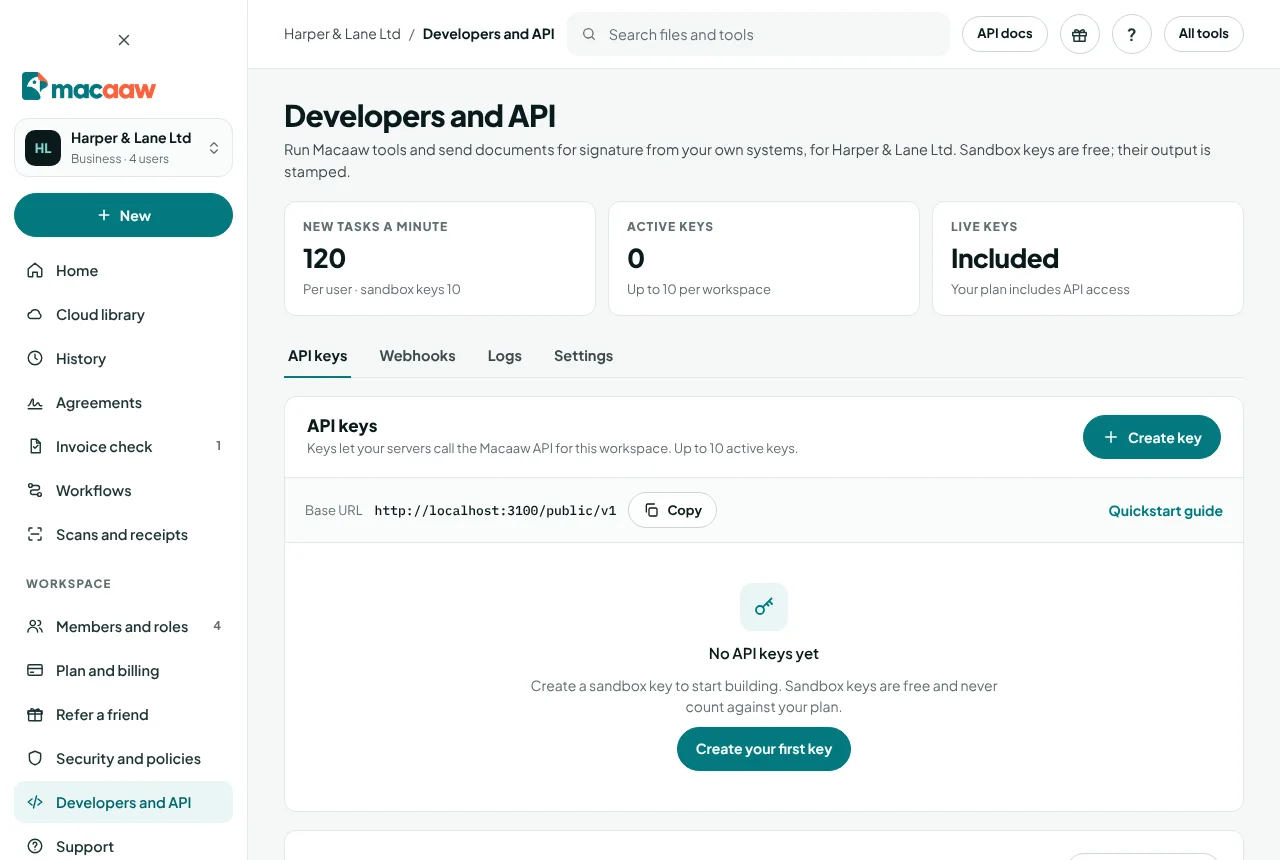
How to create an API key
- In the sidebar, choose Developers and API, then Create key (or Create your first key).
- Type a Name, for example "Production server".
- Choose the Environment: Sandbox or Live.
- Choose Create key.
- Copy the key now and store it somewhere safe, then choose I have copied it. For your security it is never shown again.
Send the key with each request in the Authorization: API-Key … header. The base address of the API is shown as Base URL.
How to revoke a key
On API keys, choose Revoke next to the key and confirm. It stops working immediately and any server still using it gets errors.
How to add a webhook
Webhooks tell your server when something happens, for example when a document is signed or a task completes, so you do not have to keep asking.
- Open Webhooks and choose Add webhook.
- Type your endpoint's URL, choose the events, and save.
- Copy the Webhook shared key that is shown once. Each delivery carries a signature made with it, so your server can check the message came from us.
- Choose Send test event to try your endpoint.
Delivery history lists every attempt. Failed deliveries are retried after 1 minute, 10 minutes and 1 hour; choose Resend to try again yourself. If your server answers 410, the webhook is turned off. Choose Regenerate key if the shared key may have leaked.
How to read the request logs
Logs lists every authenticated request from your workspace's keys for 30 days, with time, method, path, status and duration. Filter by key, status, method or date. Request and response bodies, file names and query strings are never stored.
How to allow embedded signing
To show Macaaw signing pages inside your own website in an iframe, open Settings, choose Add an origin and type your site's address, for example https://app.example.com (https, no path). Up to 10 origins. With none, signing pages open only as a full page. See the Embedded signing guide in the documentation.
Files and limits
Files sent through the API follow your workspace's deletion rule, as on the website. Repeating a request with the same idempotency key within 24 hours returns the first result instead of running it twice.
If something goes wrong
- "Live keys need a plan with API access." Use a sandbox key, or move to Pro or Business.
- "This workspace already has … active API keys." Revoke a key you no longer use.
- HTTP 429 (Too many requests). Slow down; the limits are per minute.
- A webhook shows Failed. Open the delivery to see the response or error, for example "no answer within 20 seconds" or "host name not found", fix your endpoint, then Resend.
- "Only owners and admins can manage the API." Ask an owner or admin of the workspace.
Frequently asked questions
Is the API free to try?
Yes. Sandbox keys are free on every plan. Their output is stamped and they have lower limits, so you can build and test without paying.
How is API use charged?
Live calls use processing credits, priced per page. See the credit costs on Plan and billing or the pricing page.
Where is the full reference?
In the developer documentation at /developers, with an OpenAPI file and a Postman collection.