

Find the message you see, or the problem you have, and follow the fix. If nothing here helps, contact support.
Before you start
- Reload the page and try again: many short problems go away.
- Use an up-to-date browser. Macaaw works in current versions of Chrome, Edge, Firefox and Safari.
- Check Service status. When we know about a problem, we say so there, and a notice at the top of the website links to it.
Problems with files
| You see | What to do |
|---|---|
| This PDF needs a password to open. | Use Unlock PDF with the password first. |
| This PDF has no text to convert; it is probably a scan. | Run OCR PDF first, then convert the result. |
| This file is damaged and could not be repaired. | Try Repair PDF, or export the file again from the program that made it. |
| This file type is not supported by this tool. | Check Accepts on the tool page, or convert the file first. |
| This PDF has more than … pages. | Split it with Split PDF, then work on the parts. |
| This form uses XFA, which cannot be filled here. | Open the form in Adobe Reader. |
| These files have been deleted. | The files were deleted after the retention time. Run the tool again. |
| The result looks different from the original | Converting between formats can move things; check the result. Tools marked Beta say so. |
| The page is slow on my phone | Large files use a lot of memory on a phone. Try a computer. |
Limits
| You see | What to do |
|---|---|
| You have used your … server tasks for today. Browser tools still work. | Wait until tomorrow, use a browser tool, or move to Pro for unlimited server tools. |
| Files can be up to … MB on your plan. | Compress or split the file, or move to a plan with bigger files (500 MB on Pro). |
| You can add up to … files at once on your plan. | Run the tool more than once, or move to a plan with more files per task. |
| You have used your OCR pages for this period. | On Pro and Business, buy credits; on Free, wait for the next month or upgrade. |
| This tool is part of Pro. | Try Pro free for 14 days. |
| You have reached your monthly cap on cloud text reading… | Your workspace admin set a cap for you. Ask them to raise it. |
| Too many requests. Please wait a moment. | Wait a minute, then try again. |
Signing in
| You see | What to do |
|---|---|
| Too many attempts. Try again in 15 minutes. | Wait, then use Forgot it? to reset your password. |
| Please confirm your email first. | Open the confirmation email, or choose Resend email on your account home. |
| This account is suspended. Contact support. | Contact support. |
| Your team requires two-factor. Set it up to continue. | Turn on two-step sign-in on Profile and security. |
| The sign-in link does not work | Links work once and expire after 15 minutes. Ask for a new one. |
Payments and plans
| You see | What to do |
|---|---|
| We could not take your last payment. | Choose Update card and add a working card. |
| Activating your plan… for a long time | Leave the page; we email you when the plan is active. |
| You do not have enough credits for this task. | Buy a credit pack on Plan and billing. |
| Your plan has ended. | Choose Resubscribe to start it again. |
Scanner
| Problem | What to do |
|---|---|
| The camera does not start | Allow the camera for macaaw.com in your browser's site settings, then reload. |
| Scans have disappeared | The browser cleared its storage. Turn on Protect from automatic clean-up in Settings, install the app, or sync to the cloud library. |
| Storage almost full. | Delete scans you no longer need, or turn off Keep original photos. |
Using Macaaw offline and updates
| Problem | What to do |
|---|---|
| You're offline. at the bottom of the screen | Tools that run in your browser (marked Runs in your browser) keep working once you have opened them; in the installed app every one of them does. Server tools, your account, the cloud library and Invoice check need a connection. |
| You are offline page instead of the page you opened | That page has not been opened on this device yet, or it needs a connection (your account, sign-in, results). Reconnect and choose Try again. |
| Update available with a Reload button | A new version of Macaaw is ready. Choose Reload when you are not in the middle of a task. Your files are not affected. |
| The app still looks old after an update | Close the app completely (swipe it away) and open it again. |
| No Install Macaaw card | It appears from your second visit or after a finished task, never inside the installed app, and not for 90 days after Not now. You can always use the browser's menu: Install app or Add to Home screen (Safari: Share, then Add to Home Screen). |
Agreements
| Problem | What to do |
|---|---|
| You have sent all the agreements your plan allows this month. | Wait for the next cycle or move to a plan with more. |
| A signer's link does not work | The agreement may have expired, been voided or declined. Check its status. |
| A signer did not get the email | Ask them to check their spam folder, check the address, then choose Remind. |
How to check whether Macaaw is working
- Open Service status. The top line says whether everything works.
- Find the part you use, for example Server tasks or Payments. It shows Operational, Maintenance, Degraded performance, Partial outage or Major outage, with its uptime over the last 90 days.
- Read Active incidents for what we know and when we last updated it. Scheduled maintenance lists planned work; we announce it on the website 24 hours ahead.
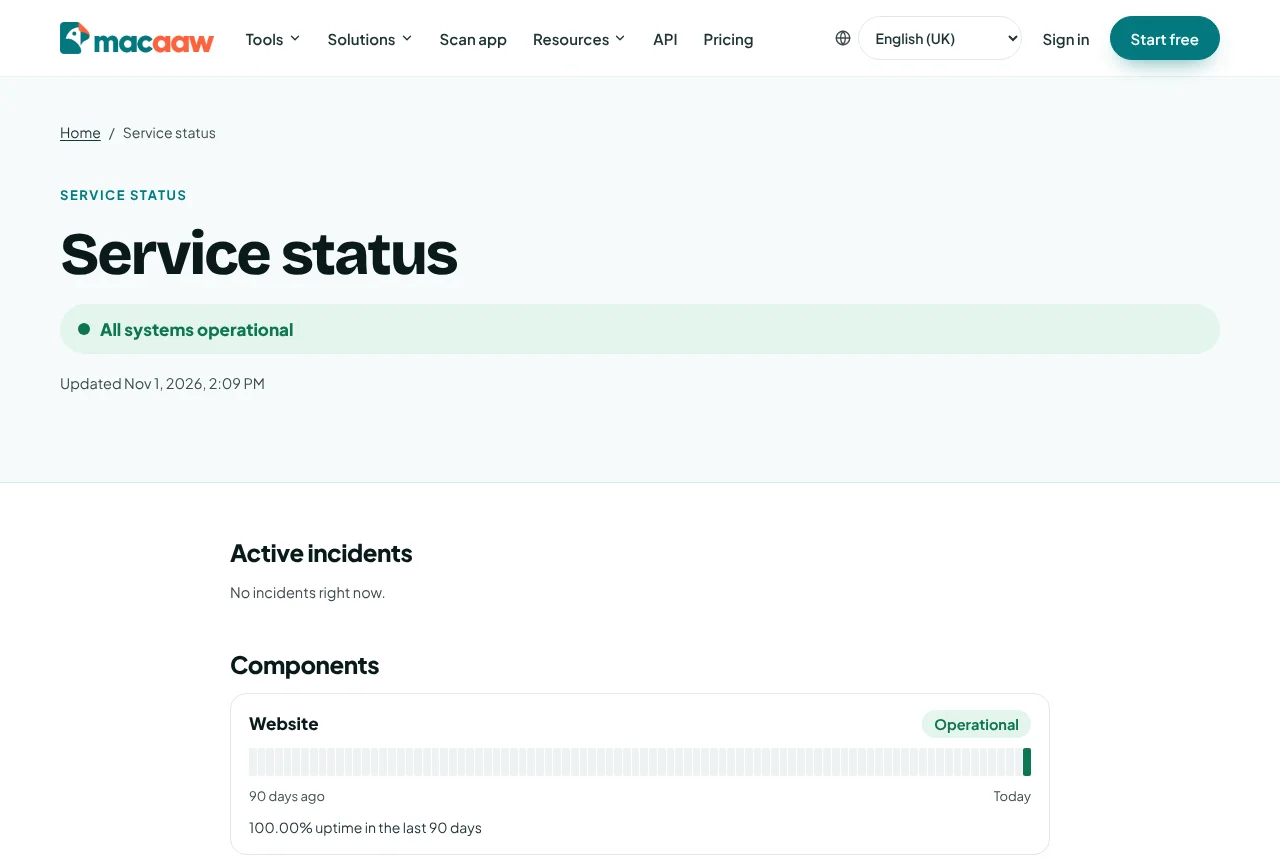
If the status page does not load at all, use the copy at status.macaaw.com, which stays up when the rest of Macaaw is down.
If something goes wrong
If your problem is not listed, or the fix did not work, contact support. Tell us what you were doing, the exact message you saw, and, if it was a job, its job ID from History.