

Macaaw has three plans: Free, Pro for one person, and Business for teams, priced per user. Everything about your plan is on Plan and billing.
Before you start
- Confirm your email address before you buy anything.
- In a Business workspace, only the owner and billing managers can see Plan and billing.
- Payments are handled by Stripe. We never see or store your full card number.
The plans
| Free | Pro | Business (per user) | |
|---|---|---|---|
| Price | £0 | £7.99 a month or £59.88 a year | £9.99 a month or £83.88 a year |
| Largest file | 50 MB | 500 MB | 500 MB |
| Files per task (server tools) | 3 | 50 | 200 |
| Files per task (browser tools) | 25 | 100 | 200 |
| Server tasks a day | 20 | Unlimited (fair use) | Unlimited (fair use) |
| Cloud OCR pages a month | 50 | 500 | 750 |
| Office conversions a month | 10 | 300 | 500 |
| Agreements sent a month | 3 | 50 | 100 |
| Signers per agreement | 2 | 10 | 20 |
| Saved workflows | None | 25 | Unlimited |
| Cloud library storage | 1 GB | 100 GB | 250 GB |
| AI questions a month | 10 | 300 | 500 |
| AI clean-up pages a month | 5 | 300 | 500 |
| Invoice checks a month | – | – | 50 |
| Files kept on the server for up to | 1 hour | 2 hours | 2 hours |
| Pro tools | – | ✓ | ✓ |
| Ads | Yes | No | No |
| Live API keys | – | ✓ | ✓ |
| Free trial | – | 14 days | 30 days |
Every plan includes all 40 tools, the scanner app, no watermark and processing in the UK. The full comparison is on the pricing page.
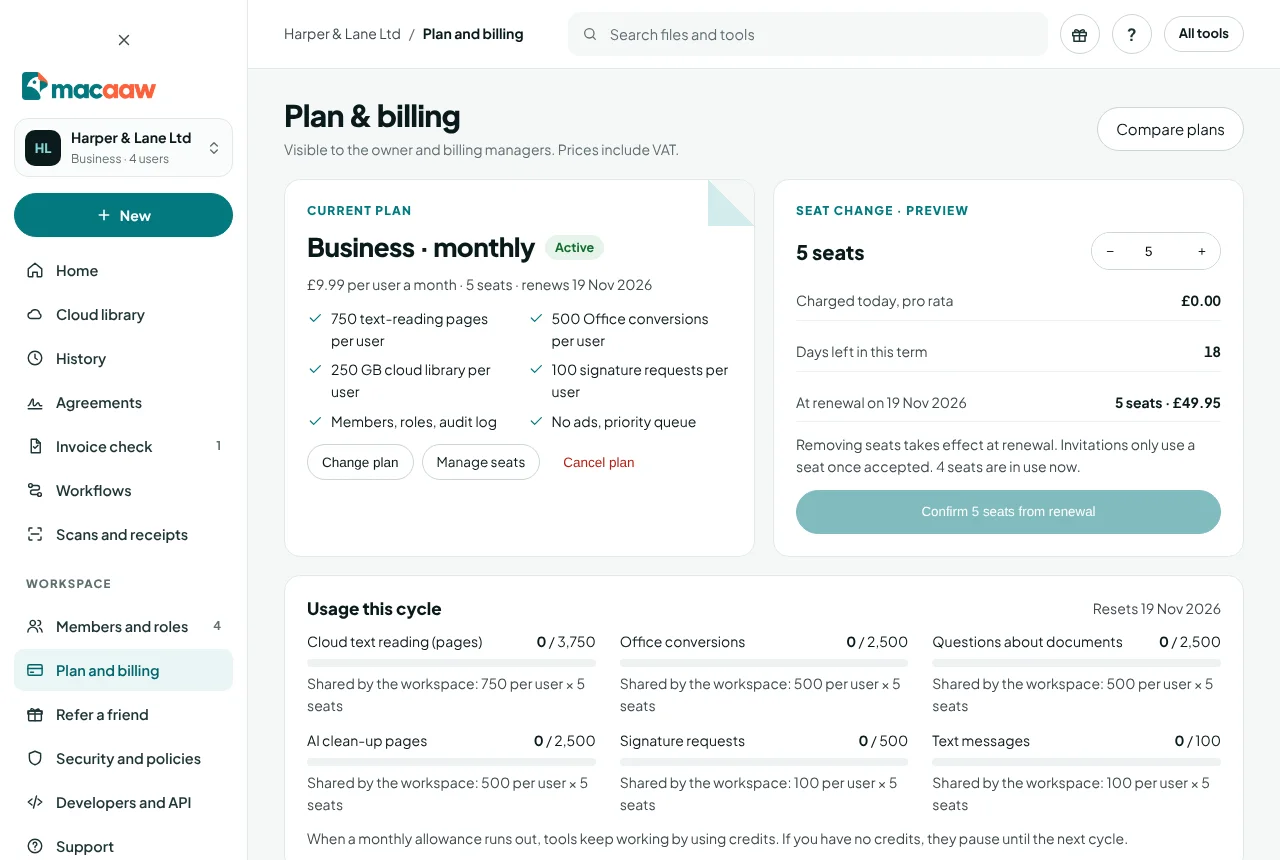
How to upgrade to Pro
- Choose Plan and billing in the sidebar.
- Under Upgrade to Pro, choose Pro monthly (£7.99) or Pro yearly (£59.88, which works out at £4.99 a month).
- Pay on the Stripe checkout page. Back in Macaaw, Activating your plan… changes to Pro is active. Thank you! once the payment is confirmed.
Pro is free for 14 days if you have not had a trial before.
How to start Business
Business belongs to a workspace. Create one first (Business workspace), switch to it, then on Plan and billing choose the seats under Start Business for this workspace and pay monthly or yearly. A new workspace gets a 30-day trial.
How to change seats
- In the Business workspace, open Plan and billing and use the seat picker under Seat change · preview.
- The preview shows what is Charged today, pro rata and the amount At renewal.
- Choose Confirm and pay to add seats, or Confirm … seats from renewal to remove them.
Added seats are charged today; removed seats take effect at renewal. You cannot go below the seats in use (members and pending invitations).
How to change your card or download invoices
- On Plan and billing, choose Open billing portal.
- In Stripe's secure portal you can update your card, download VAT invoices, change your company name, address or VAT number, and switch between monthly and yearly.
Moving to yearly takes effect at once with the unused time credited; moving to monthly takes effect at your next renewal. Cancelling happens in Macaaw, not in the portal (see below).
How to cancel your plan
In a Business workspace only the owner and billing managers can cancel; for Pro, you cancel your own plan.
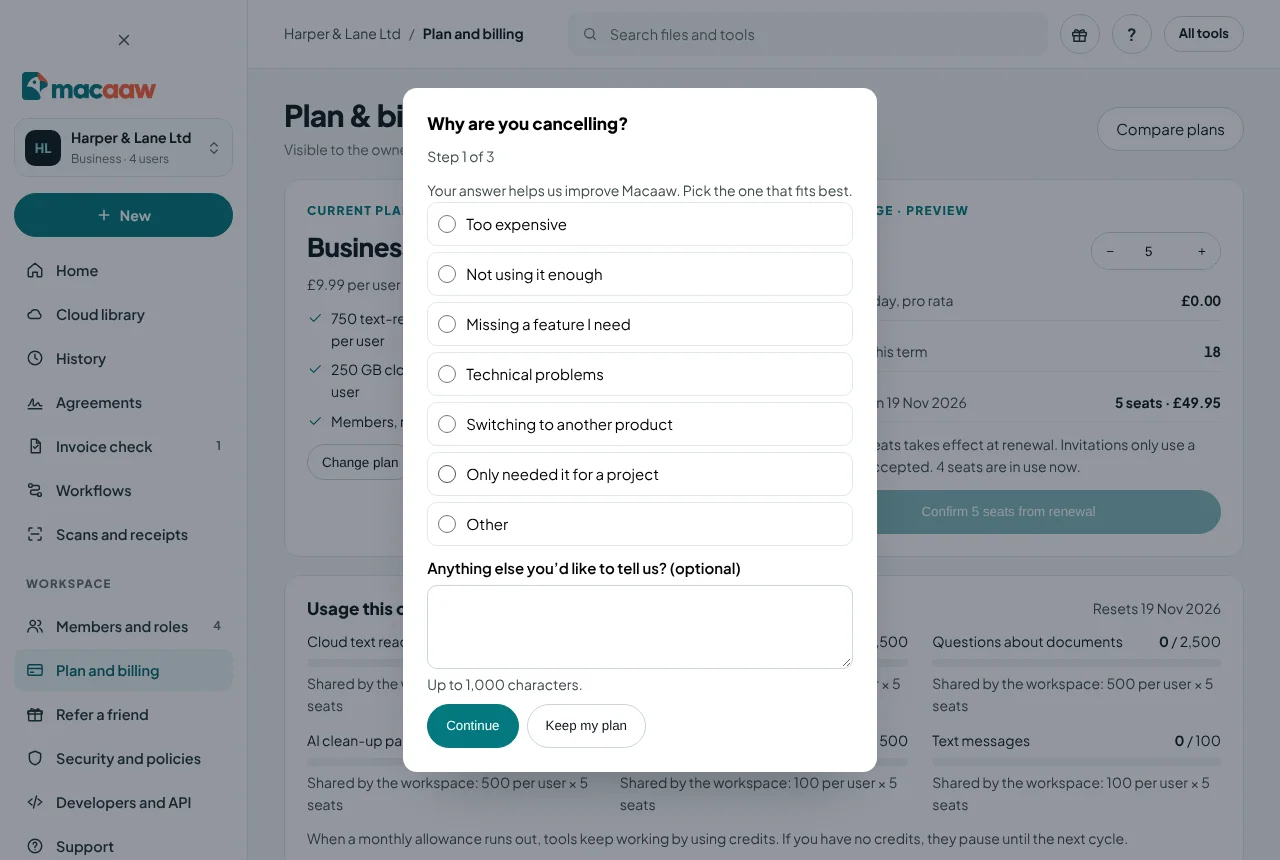
- On Plan and billing, choose Cancel plan.
- Why are you cancelling? Pick the reason that fits best: Too expensive, Not using it enough, Missing a feature I need, Technical problems, Switching to another product, Only needed it for a project or Other. You can add a comment (up to 1,000 characters). Choose Continue.
- Depending on your reason, we may suggest one alternative. You can always choose No thanks, continue to cancel:
- Too expensive: Stay for 30% off: a discount on your next 3 months. If you pay monthly, we also show the yearly price.
- Not using it enough or Only needed it for a project: Pause instead of cancelling for 1, 2 or 3 months (see below).
- Technical problems or Missing a feature I need: Tell us more opens the support form with your reason filled in, and Browse the Help centre may already have the answer.
- A discount or a pause is offered at most once every 12 months.
- Cancel your plan? shows when your plan ends. Choose Cancel my plan.
Your plan stays active until the end of the period you have paid for (or the end of your trial), and you won't be charged again. We email you a confirmation with the date. After that the account moves to Free, and saved workflows are kept read-only for 90 days in case you come back.
Changed your mind? Until that date, Plan and billing shows Your plan ends on … with Keep my plan. Choose it and your plan simply carries on.
How to pause your plan
When you choose Not using it enough or Only needed it for a project while cancelling, you can pause instead:
- Choose 1, 2 or 3 months under Pause for, then Pause my plan.
- While paused you aren't charged, your account uses the Free plan's limits, and your files, workflows and settings are kept. Plan and billing and your account home show Your plan is paused until ….
- Your plan and payments start again by themselves on that date. To start sooner, choose Resume now.
How credits work
Credits pay for anything beyond your plan's monthly allowances, and for every call to the API. On Pro and Business, when an allowance runs out, tools keep working by using credits. If you have no credits, they pause until the next cycle. On Free, you are offered an upgrade instead.
| What | Credits |
|---|---|
| Cloud OCR page beyond the allowance | 1 |
| Office conversion beyond the allowance | 2 |
| Extract invoice data, per document | 5 |
| API: table extraction, per page | 2 |
| API: other tools, per page | 1 |
| AI question beyond the allowance | 1 |
| AI clean-up page beyond the allowance | 2 |
| Text message (SMS) | 2 |
| Receipt read for an expense report | 5 |
| Invoice check beyond the allowance | 5 |
To buy credits, open Plan and billing › Processing credits and choose a pack:
| Pack | Price |
|---|---|
| 500 credits | £5.00 |
| 2,000 credits | £15.00 |
| 10,000 credits | £60.00 |
Credits last 12 months. They appear as soon as the payment is confirmed.
If a payment fails
We email you and show We could not take your last payment on your account home. Choose Update card. You keep your paid plan for a grace period (7 days by default) while Stripe tries the payment again. If the payment still fails, the account moves to Free.
Discounts
Schools, colleges, universities and registered charities get 40% off Business. Promotion codes and referrals are explained in Offers, discounts and referrals.
If something goes wrong
- "Confirm your email address to unlock checkout and teams." Confirm your email first, then try again.
- "Activating your plan…" for a long time. Leave the page; we email you when the plan is active.
- "Only the owner and billing managers can see plan and billing for this workspace." Ask one of them.
- "There are no payment details yet." Choose a plan or buy credits first; the portal opens once you have paid once.
- I don't see Cancel plan. Only the workspace owner and billing managers can cancel a Business plan. If the plan is already cancelling, you see Keep my plan instead.
- "This offer has already been used in the last 12 months." The discount or pause was already used for this plan; you can still cancel.
- "You do not have enough credits for this task." Buy a credit pack, or wait for your allowances to reset on the date shown under Usage this cycle.
Frequently asked questions
Do prices include VAT?
Yes. All prices include UK VAT. Your VAT invoices are in the billing portal.
What happens when my trial ends?
We email you a few days before. If you do nothing, your plan starts and your card is charged. Cancel before then and you pay nothing; you simply move back to Free.
Do credits expire?
Yes, 12 months after you buy them or they are granted.